Automating identity and access management workflows with Qntrl
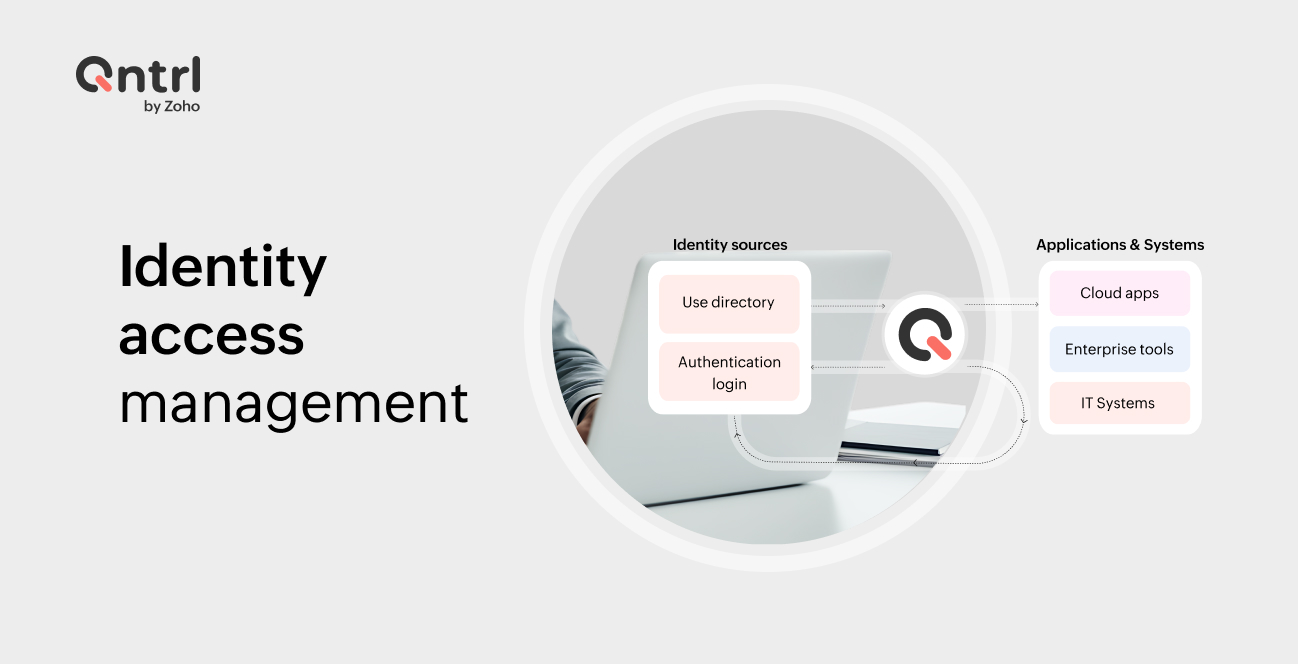
Identity and access management (IAM) is one of the most critical operational responsibilities for IT teams today.
Modern organizations rely on dozens of applications across cloud platforms, identity providers, and internal systems. Managing who gets access to what and when often requires coordination across multiple tools and teams.
Typical workflows involve:
Requesting access to applications
Manager and IT approvals
Provisioning accounts in different systems
Maintaining audit trails for security and compliance
Without automation, these processes quickly become manual, fragmented, and difficult to scale.
Qntrl adds value across the entire IAM lifecycle, from request initiation (manual or automated) through structured approvals to access provisioning, updates, and eventual revocation. By orchestrating these stages within a single workflow, it eliminates fragmented execution and ensures consistency, control, and traceability across identity operations.
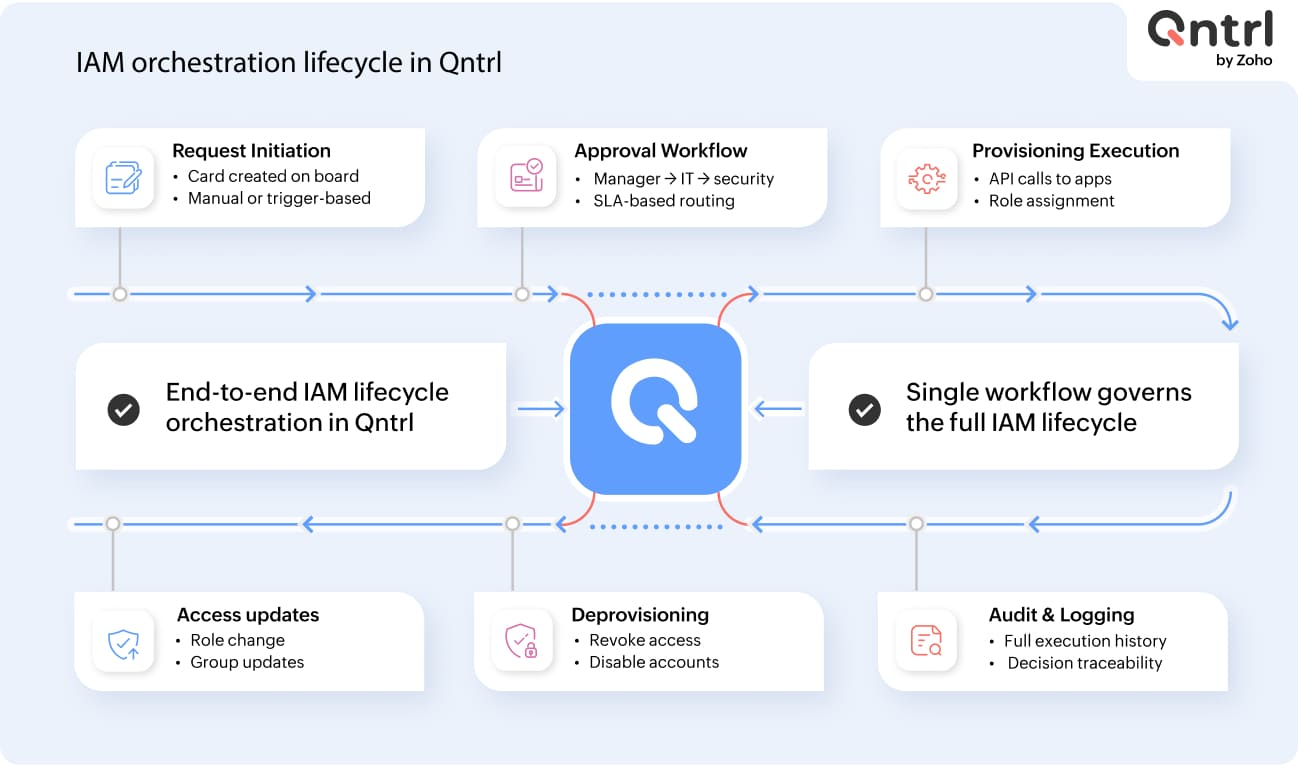
Where Qntrl fits into IAM operations
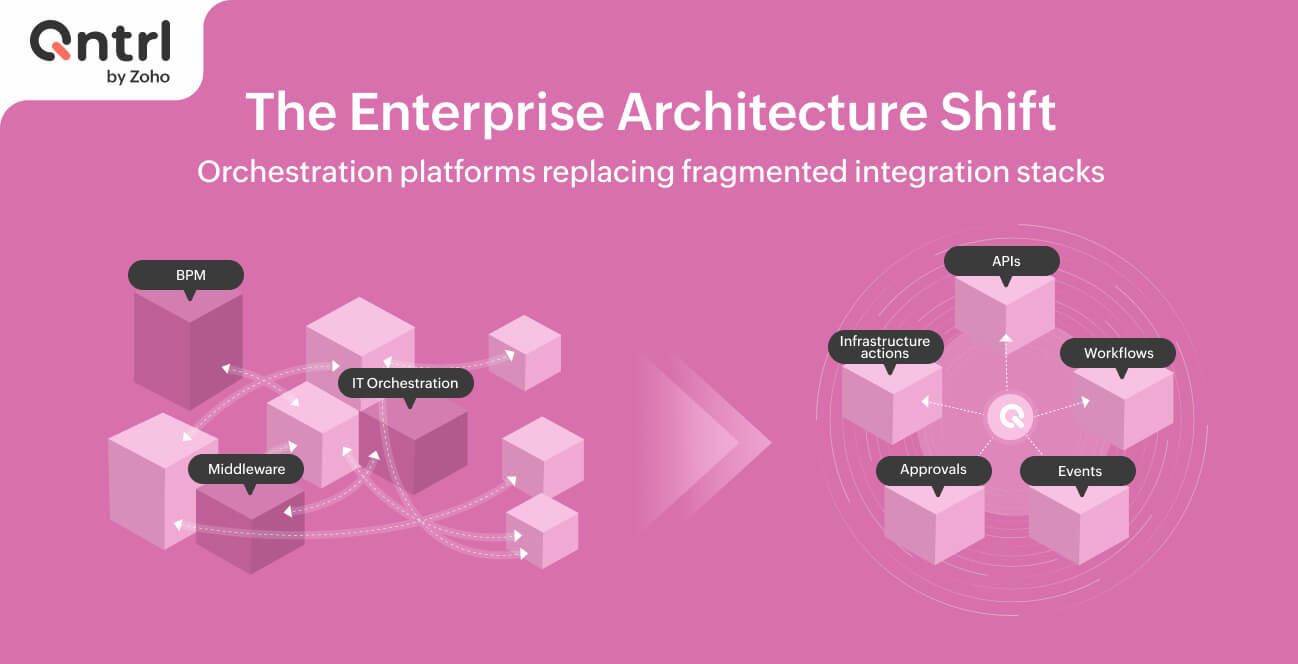
Instead of managing access tasks manually across multiple systems, Qntrl acts as an orchestration layer that coordinates identity-related workflows.
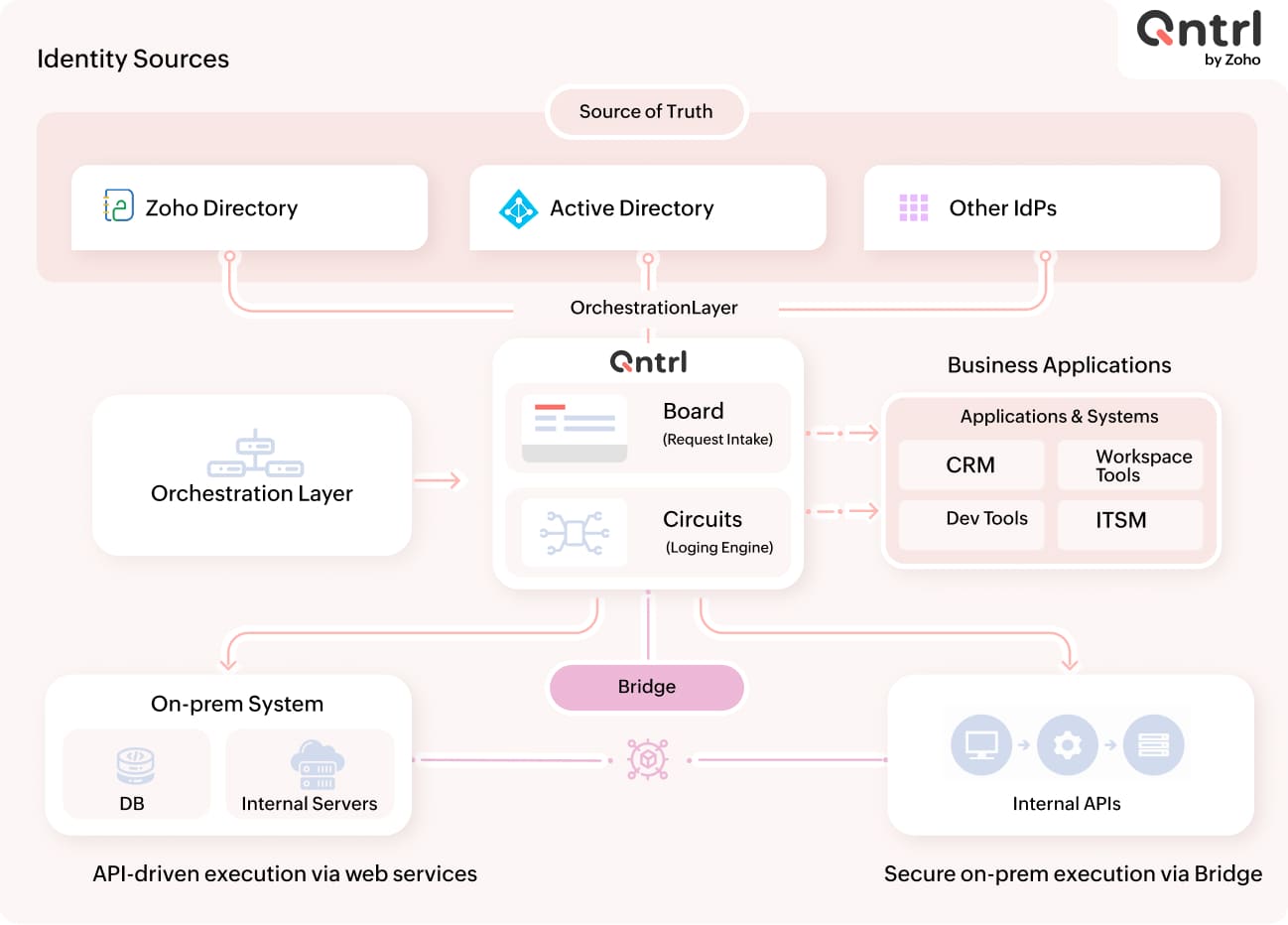
A typical architecture includes four components.
1. Circuits: The automation engine
At the center of the system are Qntrl circuits.
Circuits are visual workflows that define automation logic using connected states. Each state represents a specific step, such as an approval request, API call, or system update.
Circuits allow IT teams to model IAM workflows like:
Access requests
Application provisioning
Account updates
Deprovisioning during offboarding
Once triggered, a circuit executes the entire workflow automatically.
2. Identity sources
User identities can originate from directory systems, such as:
Zoho Directory
Active Directory
Other enterprise identity providers
These directories act as the source of truth for users and authentication. Qntrl workflows reference this identity data when executing provisioning or access management tasks.
3. Business applications and systems
Modern organizations run multiple business applications and systems that require access management.
Examples include:
1. Microsoft 365
2. Zoho CRM
3. Google Workspace
4. GitHub
5. Jira
6. SharePoint
7. Okta
Instead of manually configuring each system separately, Qntrl workflows can automate the provisioning or revocation of access across these applications.
4. Bridge for on-prem orchestration
Some businesses still run legacy or on-premises applications and infrastructure that require access management.
Bridge acts as a secure execution agent installed inside an organization's network. It allows Qntrl circuits to interact with:
Internal servers
Databases
Internal APIs
On-prem directory systems
This enables IAM workflows to extend to these systems and integrate with them effectively, without exposing sensitive infrastructure externally.
IAM workflow walkthrough
To understand how these components work together, let's walk through a common identity management scenario.
Let's say an employee needs access to an application. Instead of manually provisioning accounts across multiple systems, Qntrl automates the entire process.
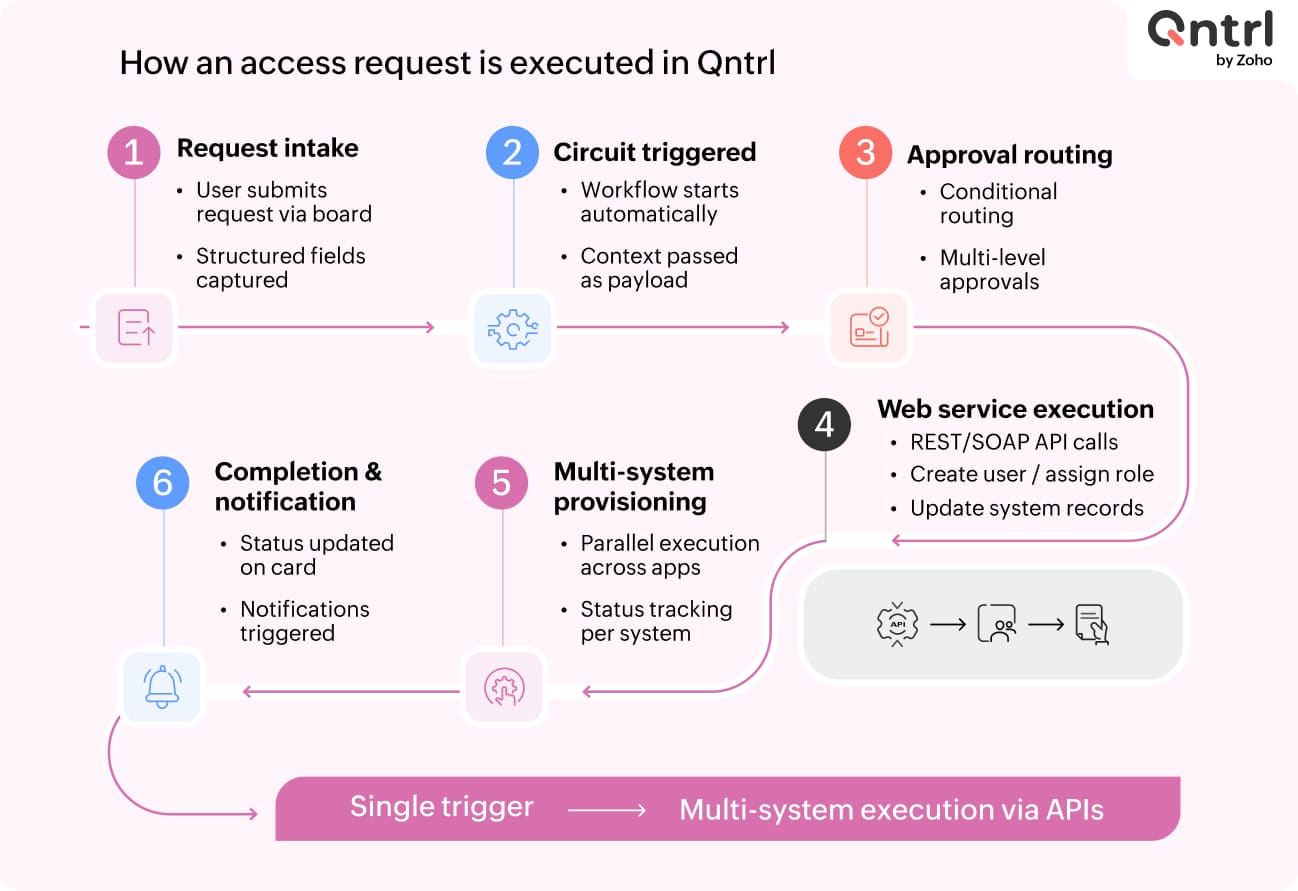
Step 1: User authentication and setup
The process begins when a user logs in to the system through the organization's identity provider.
For first-time users, onboarding may include identity verification steps, such as setting up secure login or configuring authentication. In some environments, this can include scanning a QR code to set up authentication or connect to the identity directory.
Once authentication is complete, the user is associated with their organization's identity directory.
Step 2: Submitting an access request
The user submits an application access request through a Qntrl board, which serves as the interface for raising and tracking requests.
Typical request details include:
Application name
Role or permission level
Business justification
Department
This request triggers an access provisioning circuit in Qntrl.
Step 3: Governance through approval workflows
Before provisioning occurs, the request must pass through governance controls.
In the workflow demonstrated in the interface, the circuit routes the request through approval stages such as:
Manager approval
IT administrator review
Security validation (if required)
Each step is clearly defined in the workflow, ensuring requests follow a structured process rather than informal communication channels. Every approval decision is recorded for a complete audit trail.
Step 4: Automated provisioning across applications
Once approvals are complete, the circuit begins executing provisioning actions.
These actions may include:
Creating user accounts in identity providers
Assigning roles in applications
Updating group memberships
Notifying users and administrators
Instead of administrators manually configuring access on each platform, the circuit automatically executes the required steps. Because Qntrl supports integrations with multiple applications, a single workflow can manage access across several systems at once.
Step 5: Extending automation to on-prem systems
In many organizations, IAM workflows must also interact with internal infrastructure.
For example:
Updating an Active Directory group
Creating a database user
Running scripts on internal servers
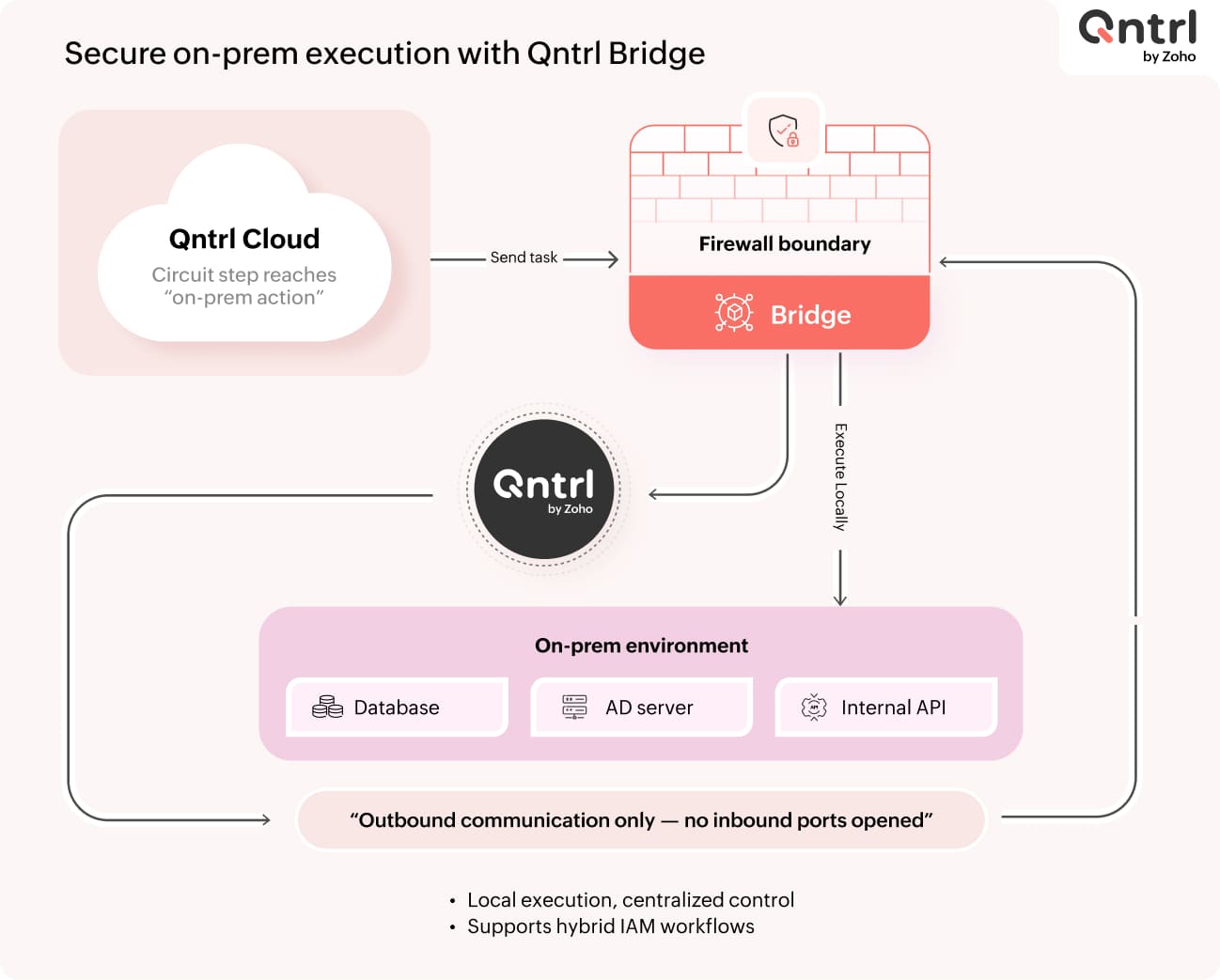
These tasks are executed through Qntrl Bridge, which runs inside the organization's network. When a circuit reaches a step that requires internal access, the task is securely executed via Bridge without exposing internal systems to the outside. This enables organizations to automate IAM workflows across hybrid environments.
Step 6: Monitoring and execution visibility
Every circuit execution produces detailed logs.
IT teams can view:
Execution status
Input and output data
Success or failure states for each step
This visibility helps teams troubleshoot provisioning issues, track automation performance, and maintain compliance records. Instead of relying on scattered logs across multiple systems, the entire workflow execution history is centralized.
Managing access revocation and offboarding
Provisioning is only one side of identity management. Access must also be removed when roles change or employees leave the organization.
Qntrl circuits can automate deprovisioning workflows such as:
Removing application access
Disabling accounts
Revoking directory roles
Notifying administrators
By automating both provisioning and deprovisioning, organizations maintain better control over access across their infrastructure.
Why IAM orchestration matters
Identity management becomes increasingly complex as organizations adopt more applications and a hybrid infrastructure. Without orchestration, IT teams often rely on manual coordination between systems, which introduces delays and security risks.
By using Qntrl as an orchestration layer, organizations can:
Automate IAM workflows across multiple systems
Maintain governance through structured approvals
Connect cloud applications with internal infrastructure
Ensure complete audit visibility for every access decision
Bringing structure to identity operations
Identity and access management is no longer limited to a single directory or authentication system. Modern environments require automation across identity providers, applications, and internal infrastructure.
Qntrl enables IT teams to design these workflows visually using Circuits and execute them across both cloud and on-prem systems through integrations and Bridge. The result is a structured, auditable, and scalable approach to identity operations.
FAQ: Implementing IAM workflows with Qntrl
1. How does Qntrl fit into an existing IAM stack?
Qntrl does not replace your identity provider (IdP) or directory. It sits as an orchestration layer on top of systems like Active Directory, Zoho Directory, or Okta.
It coordinates request intake (via boards), approval workflows (via circuits), and provisioning actions (via APIs or a bridge).
You continue using your existing identity systems as the source of truth while Qntrl manages the workflow logic across them.
2. How do we capture and standardize access requests across teams?
Access requests are submitted through Qntrl boards.
Each request can be structured with, application name (dropdown or dynamic list), role/permission level, justification, department, or cost center.
Boards ensure standardized request formats, centralized intake across teams, and traceability for audits. These requests automatically trigger circuits for downstream processing.
3. How are approval workflows configured for governance?
Approval logic is built inside circuits using sequential or conditional states.
You can configure:
Multi-level approvals (manager → IT → security)
Conditional routing (based on role, app, or department)
SLA-based escalations
Auto-approvals for low-risk access
Every approval is logged, creating a complete audit trail.
4. How does Qntrl automate provisioning across multiple systems?
Provisioning is executed through API calls to cloud applications, native integrations, and scripts executed via Bridge for internal systems.
A single circuit can create users in an IdP, assign roles in SaaS apps, update group memberships, and trigger notifications.
This eliminates the need for manual provisioning across each system.
5. How do we integrate Qntrl with our existing applications?
There are three primary integration approaches:
APIs: REST API calls for SaaS tools (e.g., CRM, ticketing, collaboration tools)
Webhooks: Trigger workflows based on external events
QntrlBridge: For internal systems without direct internet exposure
This allows flexibility regardless of your current architecture.
6. How does Qntrl handle on-premise or legacy systems?
Qntrl Bridge is deployed within your internal network.
It enables execution of scripts (PowerShell, shell), database operations, Active Directory updates, and internal API calls.
Bridge acts as a secure agent, so no inbound firewall exposure is required.
7. How do we manage hybrid environments (cloud + on-prem)?
Hybrid workflows are handled within a single circuit.
Example:
Approve access (cloud)
Create user in SaaS app (API)
Update AD group (via Bridge)
Notify user
This ensures end-to-end orchestration without splitting workflows across tools.
8. How is access revocation and offboarding handled?
Deprovisioning workflows can be triggered by manual requests (via boards), HR system events, and scheduled triggers.
Circuits can disable accounts, remove roles, revoke group memberships, and notify stakeholders.
This ensures no orphaned access remains after role changes or exits.
9. How does Qntrl ensure auditability and compliance?
Every action in a circuit is logged, including request details, approval decisions, execution steps, timestamps, and outcomes.
You get:
End-to-end traceability
Centralized logs
Easier audit reporting
This removes the need to aggregate logs from multiple systems.
10. How do we monitor and troubleshoot workflow executions?
Qntrl provides execution-level visibility for each circuit run step-by-step status tracking, input/output data per step, error logs, and failure points.
Teams can quickly identify failures, retry or fix specific steps, and optimize workflows over time.
11. Can we start small and scale IAM automation over time?
Yes. You can begin with a single use case, such as application access requests, and then expand to:
Multi-app provisioning
Role-based access control
Full onboarding/offboarding workflows
Since circuits are modular, workflows can be extended without redesigning everything.
12. What kind of IAM use cases are best suited for Qntrl?
Qntrl is ideal for:
Access request and approval workflows
Onboarding and offboarding automation
Role-based provisioning
Cross-system access management
Hybrid IAM workflows
It is especially useful where multiple systems and teams are involved.
13. How long does it take to implement IAM workflows in Qntrl?
Initial workflows can be set up quickly (days to weeks), depending on number of applications, integration complexity, and approval logic requirements.
A typical phased approach:
Define request structure (board)
Design approval flow (circuit)
Integrate key systems
Expand to additional apps and use cases
14. Does Qntrl support role-based or policy-driven access?
Yes. You can design circuits that assign roles based on department or job function, enforce predefined access policies, and dynamically route approvals based on risk level.
This allows transition from ad-hoc access to structured, policy-driven IAM.
15. How do we ensure security while automating access workflows?
Security is maintained through controlled approvals before provisioning, role-based permissions within Qntrl, secure execution via Bridge (no exposure of internal systems), and audit logs for every action.
Automation reduces human error while maintaining governance controls.

Enjoying your reading?
Enjoy organization and visibility too!
Qntrl can help you organise, control and improve production and projects in your team.